
|
How do I track my Klaviyo flows using ClickMagick?
Tracking your Klaviyo flows with ClickMagick is simple.
All you need to do is add UTM parameters to your emails, as explained in this article:
How do I track my emails?
Klaviyo can automatically attach UTMs to all your links, so you don’t have to edit each one manually.
That said,we’ll need to make a few small adjustments to the default Klaviyo template.
1. In Klaviyo, click on “Settings” to get into the settings menu, and then click on “Other.”
2. Click on “UTM Tracking” and make sure that Source, Medium and Campaign are all enabled.
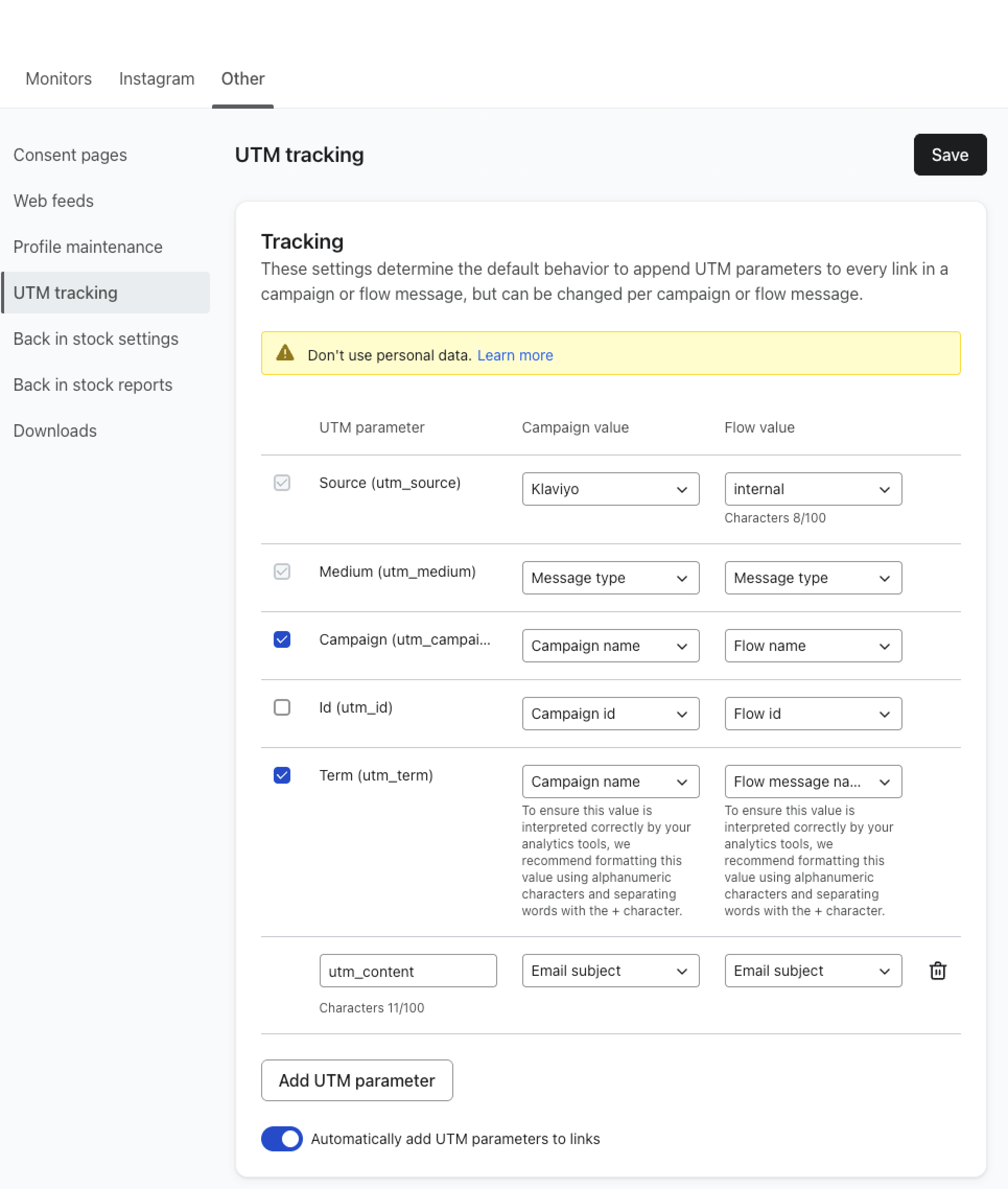
3. Feel free to use whatever values make sense for you and your business for Medium and Campaign but for Source – you need to use “internal”.
And that’s it! You’ll now be able to track your flows in Klaviyo.
Article 1043 Last updated: 10/06/2025 3:54:58 AM
https://www.clickmagick.com/kb/?article=1043