
|
Can I change my ClickMagick username?
You sure can — and we’ll show you how at the end of this explanation.
Just keep in mind that your current Smart Links contain your username:
https://www.clkmg.com/[USERNAME]/…If you change your username, all the links inside your account will immediately use your new username, breaking any external links that you have on websites, blogs, in banners, in email messages, or that you’ve given to paid traffic sources, and so on.
In other words, be aware that you can lose traffic if you don’t immediately go out and update all of your external links.
Be especially careful about changing your username if you’ve got any paid traffic currently arriving and you gave the ad or traffic source a link—like the one above—that contains your username. If you have, let all the traffic arrive before changing your username.
Note: If you’ve created a custom domain using a CNAME DNS record and directed all your traffic through that domain that does not contain your username, then you can change your username without worrying about losing any traffic. In this case, because your custom domain doesn’t use your username, it’s not affected when you change your username.
How to Change Your Username
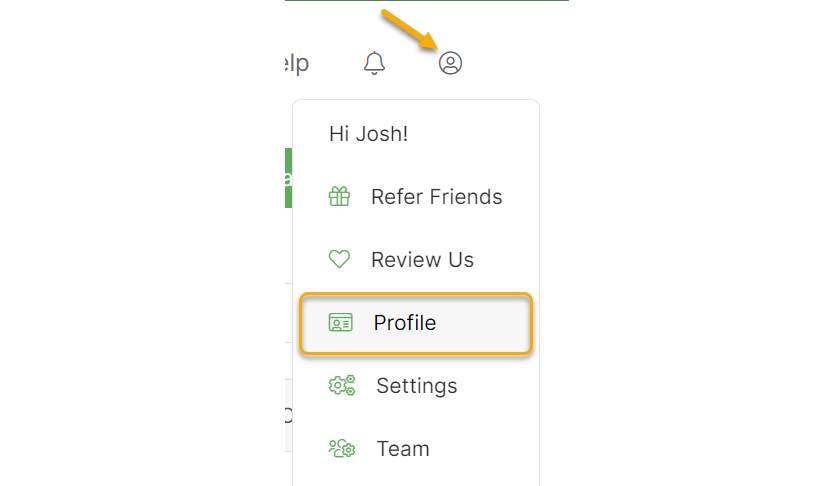
To change your username, go to your User Profile, which you can always find in the Account menu at the top of any page.
Select the “Change Username” option, update your username, and save your changes.
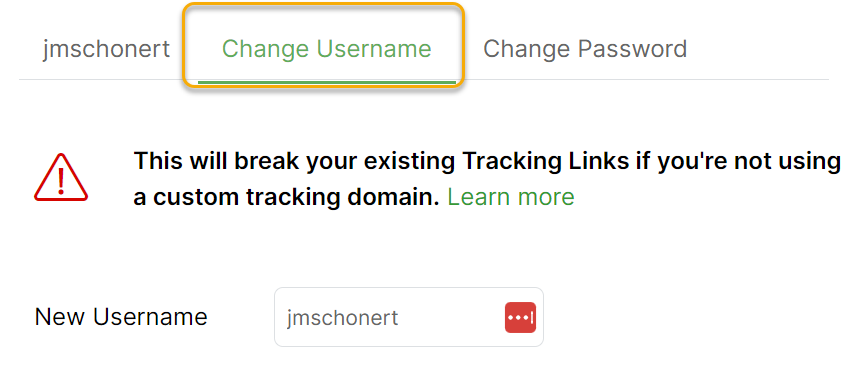
Remember that you can only change your username once every 24 hours and that once you’ve changed it, someone else might take your original username.
Tip: If you are interested in changing the username of your affiliate account—which is different—you can do that too. Contact us at the Help Desk, and we’ll be happy to assist you.
Article 30 Last updated: 09/16/2025 2:34:32 PM
https://www.clickmagick.com/kb/?article=30